

The reality of modern dentistry
The dental practice of today looks dramatically different than it did even a decade ago. We’ve seen a clear shift towards patient-centric care, where the focus is less on simply treating teeth and more on comprehensive oral health and the patient experience. This requires more detailed record-keeping, personalized communication, and a greater emphasis on preventative care. Practices are also grappling with increasingly complex billing procedures and a constant stream of data from various sources.
This increased complexity isn’t accidental. The sheer volume of data generated by modern dentistry – from digital radiographs to patient histories – demands robust organizational tools. Simultaneously, the financial pressures on dentists are mounting. Shrinking reimbursements from insurance companies, coupled with rising overhead costs like materials and staffing, are forcing practices to become more efficient. Attracting and retaining patients in a competitive market adds another layer of challenge.
Burnout is hitting the profession hard. The American Dental Association found in 2023 that 30% of us feel emotionally exhausted. Most of that stress comes from the mountain of paperwork that keeps us away from actual patient care. Good software isn't just a tool; it's a way to get back to the work we actually enjoy.
The need for efficient practice management isn’t just about survival; it’s about thriving. Practices that embrace technology and streamline their operations are better positioned to deliver high-quality care, build strong patient relationships, and achieve long-term success. The right software isn’t a luxury anymore; it’s a necessity for modern dental practices.
Features that actually matter
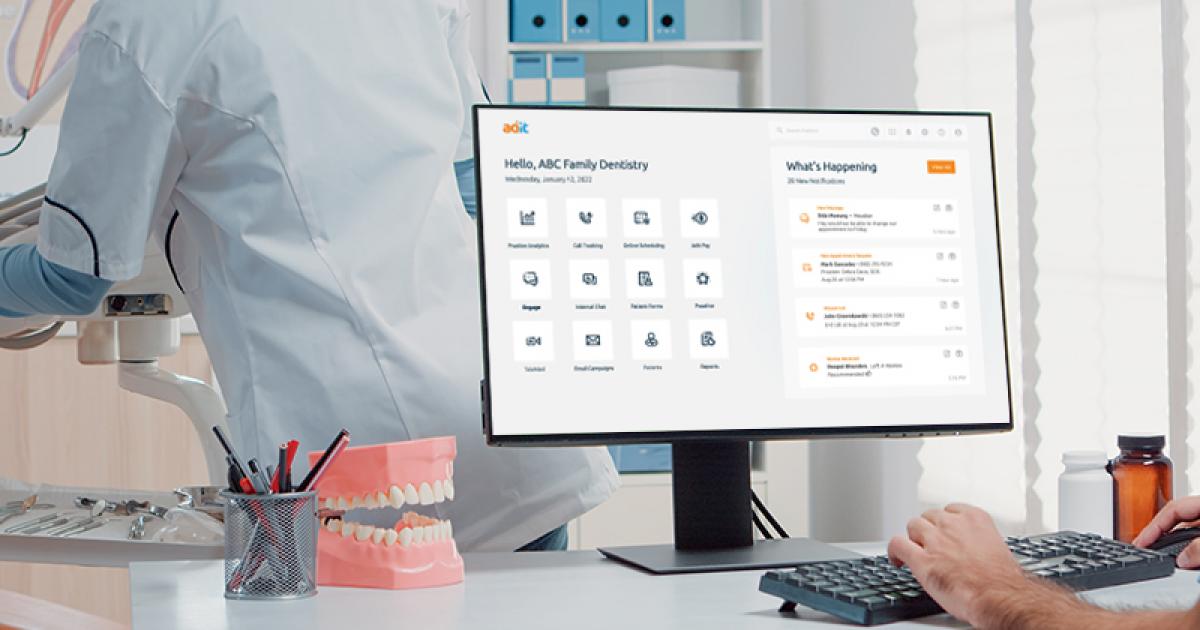
Don't just look at a feature list. You have to see how these tools actually fit into a busy Tuesday morning. Scheduling is the best example. A modern system handles the online booking and reminders automatically so the front desk isn't stuck on the phone all day.
Patient communication is another critical area. The days of relying solely on phone calls are over. Patients expect to be able to communicate with your practice via text message, email, and even secure online portals. Integration with email marketing platforms allows you to send targeted messages, promote services, and nurture patient relationships. This level of communication fosters loyalty and encourages preventative care.
Digital charting is now standard, but the capabilities vary widely. Look for software that allows for comprehensive digital records, seamless integration with digital imaging systems like Dexis or Schick, and customizable charting templates. Interoperability is key here – the ability for different systems to "talk" to each other and share data without manual entry. This minimizes errors and saves valuable time.
Billing and insurance processing can be a nightmare, but good software can simplify it. Look for features like automated claims submission, insurance eligibility verification, and denial management. Integration with clearinghouses streamlines the process and reduces the risk of errors. Robust reporting capabilities are also essential, providing key performance indicators (KPIs) like collections rates, outstanding balances, and production by provider.
Finally, don't underestimate the importance of reporting. You need to be able to track key metrics to understand your practice's financial health and identify areas for improvement. Look for software that provides customizable reports, dashboards, and real-time data visualization. This allows you to make informed decisions and optimize your practice’s performance.
Security and staying compliant
Data breaches are a constant threat, and dental practices are increasingly targeted by cybercriminals. Patient dental records contain sensitive personal and financial information, making them valuable targets. Compromised data can lead to identity theft, financial loss, and reputational damage. Security isn’t just an IT issue; it’s a legal and ethical obligation.
HIPAA compliance is paramount. Any practice management software you choose must be fully HIPAA compliant, with features like data encryption, access controls, and audit trails. You also need to ensure that the vendor will sign a Business Associate Agreement (BAA), outlining their responsibilities for protecting patient data. Failing to comply with HIPAA can result in hefty fines and legal penalties.
Ransomware attacks are on the rise, and dental practices are particularly vulnerable. These attacks can encrypt your data, rendering it inaccessible until you pay a ransom. A robust disaster recovery plan is essential, including regular data backups and a clear process for restoring your systems in the event of an attack. Preventative measures, like employee training and strong password policies, are also crucial.
Dentists aren’t necessarily security experts, so the software needs to be robust and easy to manage. Look for vendors that provide ongoing security updates, vulnerability assessments, and dedicated support. Don't assume that a vendor's claims of security are sufficient; ask for documentation and evidence of their security practices.
- Data encryption to protect information while it sits on your drive or moves across the web.
- Access controls that limit sensitive files to specific staff roles.
- Audit Trails: Tracking all user activity for accountability.
- Regular Backups: Ensuring data can be restored in the event of a disaster.
Integration: The Connected Practice
Modern dental practices rarely operate in isolation. They rely on a network of interconnected systems to manage their operations. Your practice management software should seamlessly integrate with other tools you use, such as accounting software (QuickBooks, Xero), digital imaging systems (Dexis, Schick), and lab services. Manual data entry is time-consuming, error-prone, and ultimately inefficient.
The benefits of seamless data flow are significant. For example, integrating your practice management software with your accounting software can automate billing and reconciliation, saving you hours of work. Integrating with digital imaging systems eliminates the need to manually enter radiographic data, reducing errors and improving accuracy. The goal is to create a streamlined workflow where data flows effortlessly between systems.
The rise of APIs (Application Programming Interfaces) has made it easier to integrate different software applications. APIs allow developers to connect different systems and exchange data without requiring custom coding. However, it's important to note that not all integrations are created equal. Some integrations are more robust and reliable than others.
When evaluating practice management software, consider the integrations that are most important to your practice. Don’t assume that a vendor supports all the integrations you need. Ask specific questions about integration capabilities and ensure that the software is compatible with your existing systems. Consider the long-term implications of integration – will the vendor continue to support those integrations in the future?
Cloud vs. On-Premise: Which Model Fits?
The choice between cloud-based and on-premise practice management software is a significant one. Cloud-based solutions are hosted on the vendor’s servers and accessed over the internet. On-premise solutions are installed and maintained on your own servers. Each model has its own advantages and disadvantages.
Cloud-based solutions offer several benefits, including scalability, accessibility, and reduced IT burden. You can access your data from anywhere with an internet connection, and the vendor handles all the technical maintenance and updates. However, cloud solutions raise concerns about data security and vendor lock-in. You’re relying on the vendor to protect your data and ensure the availability of the service.
On-premise solutions give you more control over your data and infrastructure. You’re responsible for maintaining the servers and software, but you have complete control over your data. However, on-premise solutions require significant IT expertise and investment. You need to have the resources to manage the servers, perform backups, and ensure security.
The cloud is becoming increasingly dominant in the dental practice management market. However, on-premise solutions still have their place, particularly for practices with specific security requirements or limited internet access. Consider your practice size, budget, technical expertise, and security needs when making your decision.
Cloud vs. On-Premise Dental Practice Management Software: A Comparison
| Feature | Cloud-Based Software | On-Premise Software |
|---|---|---|
| Cost | Typically involves subscription fees, potentially lower upfront costs. | Higher upfront costs for software licenses and hardware; ongoing maintenance fees. |
| Security | Relies on the provider's security infrastructure; data encryption and compliance certifications are crucial considerations. | Practice maintains direct control over security measures; requires robust internal IT security protocols. |
| Scalability | Generally highly scalable, allowing for easy adjustments to accommodate practice growth. | Scalability can be limited by existing hardware and infrastructure; upgrades may require significant investment. |
| IT Requirements | Minimal internal IT infrastructure needed; provider handles maintenance, updates, and backups. | Requires dedicated IT staff or outsourced IT support for installation, maintenance, updates, and data backups. |
| Accessibility | Accessible from anywhere with an internet connection, facilitating remote work and collaboration. | Typically limited to access within the practice network, potentially hindering remote access. |
| Data Control | Data is stored and managed by the provider; practice relies on provider’s data management practices. | Practice retains full control over data storage and management; allows for greater customization of data protocols. |
| Updates & Maintenance | Automatic updates and maintenance handled by the provider. | Practice is responsible for all updates, maintenance, and troubleshooting. |
| Disaster Recovery | Provider typically offers disaster recovery solutions and data backups. | Practice must implement and maintain its own disaster recovery plan and data backups. |
Illustrative comparison based on the article research brief. Verify current pricing, limits, and product details in the official docs before relying on it.
Emerging Trends: What’s on the Horizon?
Artificial intelligence (AI) and machine learning (ML) are poised to revolutionize dental practice management. AI-powered tools can automate tasks like coding, fraud detection, and appointment scheduling, freeing up staff to focus on patient care. ML algorithms can analyze patient data to identify patterns and predict future needs, enabling personalized treatment plans.
Data analytics is becoming increasingly important. Practice management software can collect and analyze vast amounts of data, providing insights into practice performance, patient demographics, and treatment outcomes. This data can be used to optimize workflows, improve patient satisfaction, and increase revenue. Predictive modeling can help practices anticipate future trends and make proactive decisions.
The integration of telehealth platforms with practice management software is also gaining traction. Telehealth allows dentists to provide remote consultations, monitor patients’ oral health, and deliver preventative care. This is particularly valuable for patients in rural areas or with limited mobility. However, it’s important to ensure that telehealth platforms are HIPAA compliant and secure.
While the full potential of AI and ML in dentistry is still being explored, it’s clear that these technologies will play a significant role in the future of practice management. Practices that embrace these technologies will be better positioned to deliver high-quality care, improve efficiency, and thrive in a competitive market.
Evaluating Vendors: Questions to Ask
Choosing the right vendor is crucial. Don’t rush the process. Take the time to thoroughly evaluate different options and ask the right questions. Start with security: How does the vendor protect patient data? What security certifications do they have? Do they offer a BAA?
Next, ask about support and training. What level of support is included with the software? Is training available for your staff? What is the vendor’s response time to support requests? Implementation is another important consideration. How long does it take to implement the software? What resources will the vendor provide to assist with the transition?
Pricing is always a factor. What is the total cost of ownership, including software licenses, implementation fees, and ongoing maintenance? Are there any hidden fees? Don’t be afraid to negotiate. Finally, ask about the vendor’s roadmap. What new features are they planning to add in the future? How committed are they to ongoing development?
Checking references and reading online reviews can provide valuable insights. Talk to other dental practices that are using the software and get their feedback. Switching software can be a major undertaking, so it’s worth doing your due diligence upfront.


No comments yet. Be the first to share your thoughts!